Google Drive - Search files or folders action
This action retrieves a list of files or folders that match your search criteria.
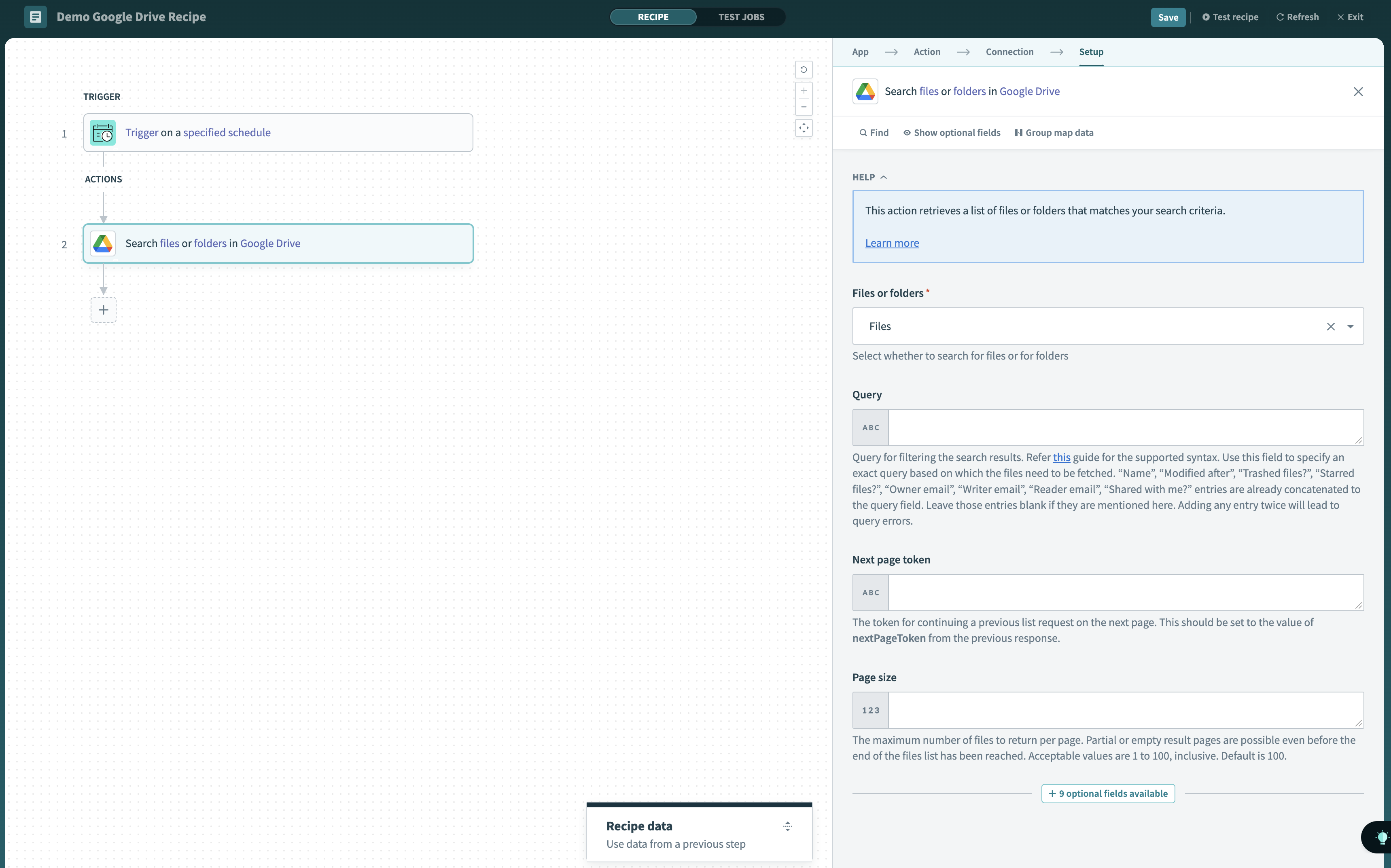 Google Drive Search files or folders action
Input
| Input field | Description |
|---|---|
| Files or folders | Select whether to search for files or folders. |
| Folder | Narrow down the search to within this folder. Does not include matching files and folders in subfolders. Leave blank to search through My Drive. |
| Name | Search for files or folders whose names partially match the given name. |
| Modified after | Search for files modified after this date. |
| Trashed files? | Set to Yes to search for files that have been trashed. |
| Starred files? | Set to Yes to search for files that have been starred. |
| Owner email | Search for files or folders belonging to this user. |
| Writer email | Search for files or folders that this user has permissions to edit. |
| Reader email | Search for files or folders that this user has permissions to read. |
| Shared with me? | Search for files or folders shared with the connected user. |
| Query | Filter the search results by an exact query. Refer to the Google Drive documentation for the supported syntax. To filter by Name, Modified after, Trashed files?, Starred files?, Owner email, Writer email, Reader email, and/or Shared with me?, you can use the Query field with the appropriate syntax, or you can use the preceding fields in this table, but not both. Adding any entry twice will lead to query errors. For example, if you enter the Name field, do not enter a name query. |
| Next page token | Specify the nextPageToken from a previous search request to retrieve the next page of search results. |
| Page size | The maximum number of files or folders to return per page. Partial or empty result pages are possible even before the end of the files list has been reached. Acceptable values are 1 to 100, inclusive. Default is 100. |
Output
Note that in Google Drive API, the terms folder and file are used interchangeably. A folder is technically a special file. As a result, whenever the field name or field description mentions file, it also applies to folder.
| Output field | Description |
|---|---|
| Next page token | Specify this token in the Next page token field to retrieve the next page of search results. |
| Incomplete search | Indicates whether the search is incomplete. |
| Files | List of files or folders found from the search. Each file/folder contains the following output fields, in addition to List size and List index:
|
| Parents | The list of the parent folders that contain the file. Each parent folder in the list contains the following output field, in addition to List size and List index:
|
| Version | A version number for the file. This reflects every change made to the file on the server, even those not visible to the user. |
| Web content link | A link for downloading the content of the file in a browser. This is only available for files with binary content in Google Drive. |
| Web view link | A link for opening the file in a relevant Google editor or viewer in a browser. |
| Icon link | A static, unauthenticated link to the file's icon. |
| Thumbnail link | A short-lived link to the file's thumbnail, if available. Typically lasts on the order of hours. Only populated when the requesting app can access the file's content. |
| Viewed by me | Indicates whether the file has been viewed by this user. |
| Viewed by me time | The last time the file was viewed by this user (RFC 3339 date-time). |
| Created time | The time at which the file was created (RFC 3339 date-time). |
| Modified time | The last time the file was modified by anyone (RFC 3339 date-time). |
| Modified by me time | The last time the file was modified by this user (RFC 3339 date-time). |
| Sharing user | The user who shared the file with the requesting user, if applicable. Each user contains the following output fields:
|
| Owners | The list of owners of the file. Currently, only certain legacy files may have more than one owner. Not populated for shared drive files. Each owner contains the following fields, in addition to List size and List index:
|
| Shared | Indicates whether the file has been shared. Not populated for shared drive files. |
| Owned by me | Indicates whether the user owns the file. Not populated for shared drive files. |
| Viewers can copy content | Indicates whether users with View access can copy the file contents. |
| Writers can share | Indicates whether users with Edit access can share the file. Not populated for shared drive files. |
| Original filename | The original filename of the file if available, or else the original value of the name field. This is only available for files with binary content in Google Drive. |
| Full file extension | The full file extension extracted from the name field. May contain multiple concatenated extensions (for example, tar.gz). This is only available for files with binary content in Google Drive. It is automatically updated when the name field changes, but it is not cleared if the new name doesn't contain a valid extension. |
File extension The final component of the full file extension (for example, gz). This is only available for files with binary content in Google Drive. | |
| MD5 checksum | The MD5 checksum for the content of the file. This is only applicable to files with binary content in Google Drive. |
| Size | The size of the file's content in bytes. This is only applicable to files with binary content in Google Drive. |
| Quota bytes used | The number of storage quota bytes used by the file. This includes the head revision as well as previous revisions with Keep Forever enabled. |
| Head revision ID | The ID of the file's most current version. This is currently only available for files with binary content in Google Drive. |
Last updated: