Google Drive - New activity trigger
The New activity trigger allows you to monitor one or more activities within a parent folder.
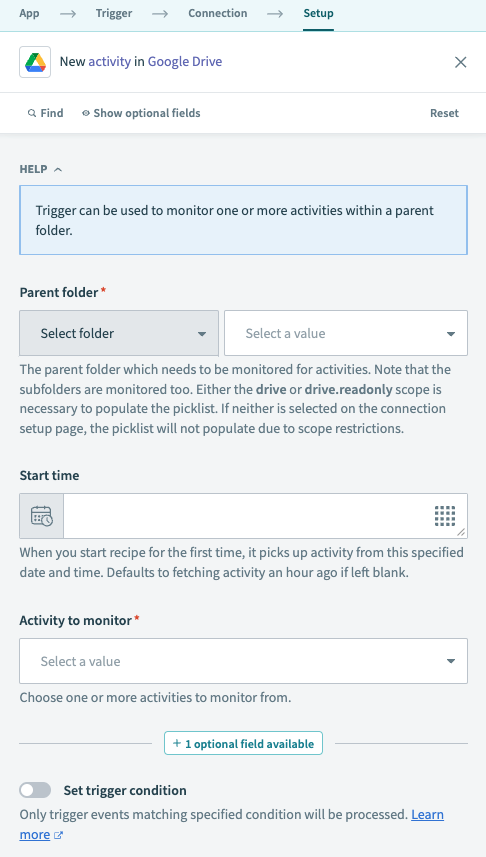 Google Drive New activity trigger
Input
| Input field | Description |
|---|---|
| Parent folder | The folder to monitor for new activity. Subfolders are also monitored. Select a folder from the picklist or enter the folder ID directly. If entering the folder ID for a shared drive (formerly Team Drive), this value must be in the form folder_id/shared_drive_id (for example, 1fm6iCMYrN7roZZ-ynpVFRTVq9mellrWp/0AB6ZFCw3XdamUk9PAA). IDs can be found at the end of folder and drive URLs. |
| Start time | When you start the recipe for the first time, it picks up activity from the specified date and time. Defaults to fetching activity an hour ago if left blank. After the recipe has been run or tested, the value cannot be changed. Refer to Triggers for more information. |
| Activity to monitor | Select one or more activities to monitor. |
Output
Note that in Google Drive API, the terms folder and file are used interchangeably. A folder is technically a special file. As a result, whenever the field name or field description mentions file, it also applies to folder.
| Output field | Description |
|---|---|
| ID | ID of the changed Google Drive item. |
| Title | Title of the changed Google Drive item. |
| MIME | MIME type of the changed Google Drive item, as stated in Google Drive's documentation. |
| Owner | Owner of the Google Drive item. Contains the following output fields:
|
| Domain | Domain: Domain of the Team Drive containing the item. Contains the following output fields:
|
| Drive | Drive: Shared drive containing the item. Contains the following output fields:
|
| Actions | A list of actions that occurred. Contains the following output fields, in addition to List size and List index:
|
| Actors | A list of actors who performed the activity. Contains the following output fields, in addition to List size and List index:
|
| Primary action detail | Details about the primary action for this activity. This is either representative, or the most important, of all actions in the activity. Contains the following output fields:
|
| Drive file | Details about the shared drive file. Contains the following output field:
|
| Timestamp | Date and time of when the activity occurred. |
Last updated: