Google Speech to Text - Convert short speech to text action
This action allows you to convert a short audio file (less than 1 minute) into a text transcript.
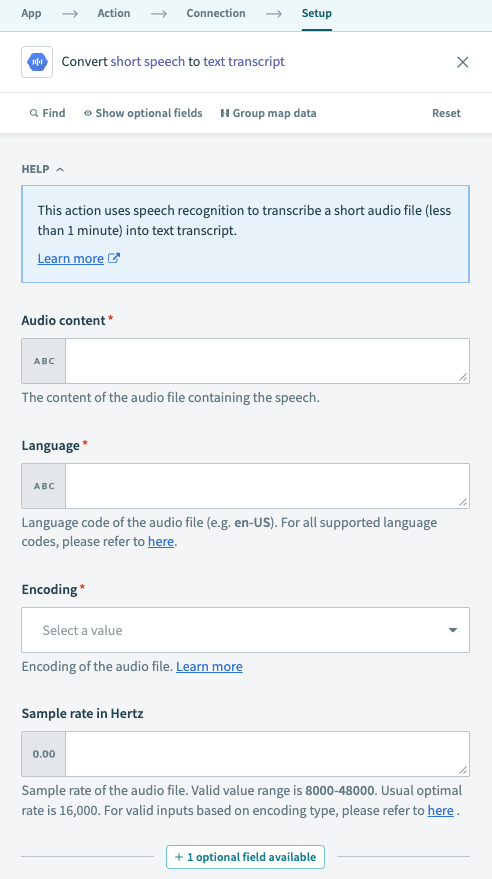 Convert short speech to text action
Input
| Input field | Description |
|---|---|
| Audio content | Accepts a content datapill, or audio content as a string. Workato automatically converts the provided audio content into base-64 format. |
| Language | Specify the language code of the audio file. Refer to Google Speech to Text documentation for more information. |
| Encoding | Specify the encoding of the audio file. Google doesn't support MP3 input. MP3 files must be converted to a supported encoding format before use in this action. |
| Sample rate in Hertz | Specify the audio file's sample rate. A valid value ranges between 8000-48000 Hz. The usual optimal rate is 16,000, but this can vary across encodings and settings. Refer to Google Speech to Text documentation for information on the best sample rate for your file. |
| Enable word time offsets | If true, the output includes a list of words, the start and end time offsets (timestamps) for those words. |
Output
| Output field | Description |
|---|---|
| Transcript | The extracted text transcript from the audio. |
| Confidence score | The confidence level for the entire transcription, with 0.0 as the lowest and 1.0 as the highest. |
| Words | List of words extracted from the audio. This list contains the start time, end time, and words extracted from the file. |
Last updated: