Okta - Scheduled event search trigger
Configure the Okta connector to execute a search of log events on a specified schedule. Events can be filtered (for example, searching for a specific target ID or actor ID).
Events will be returned in batches. The default batch size is 100 and the max batch size is 1000.
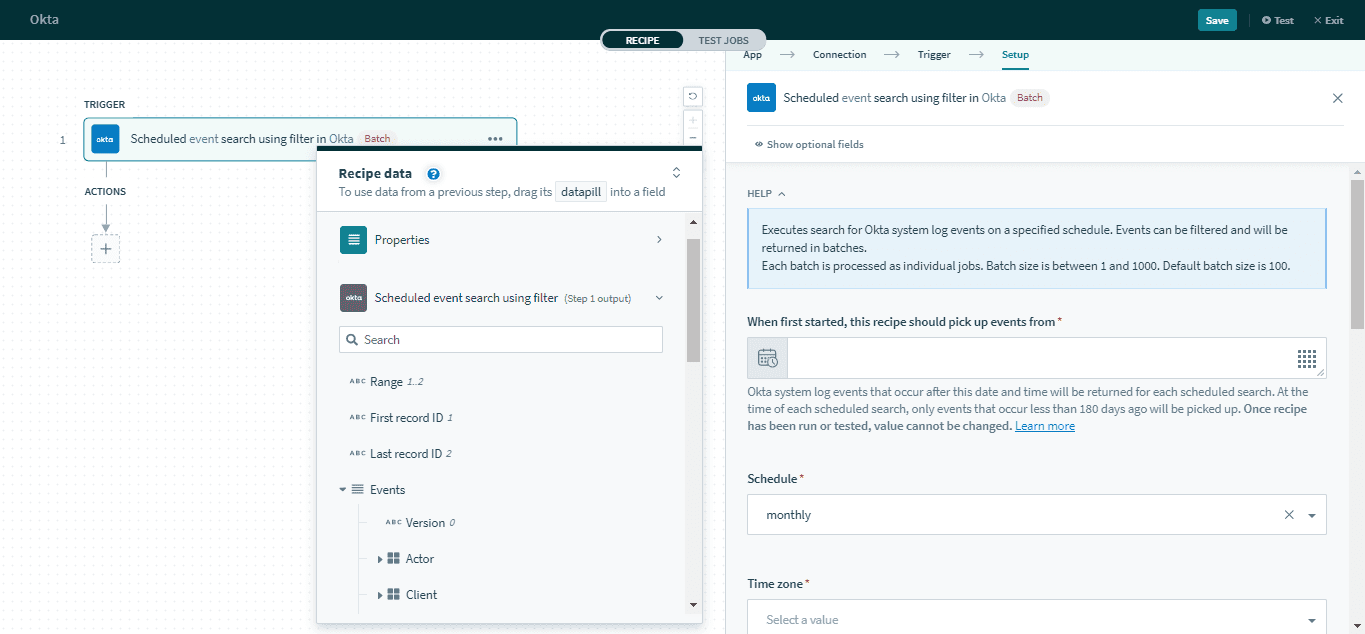 Scheduled event search trigger
Input
| Field | Description |
|---|---|
| When first started, this recipe should pick up events from | Events created after this time will be processed by the recipe. Refer to Triggers to learn more about this input field. |
| Schedule | Select which interval to execute the search. The following time definitions will follow your schedule format. Monthly will require you to specify the day of the month, hour, and minute. Daily will require you to specify which days of the week to execute the search, as well as the hour and minute. Hourly will require you to specify which days of the week to execute the search, as well as the minute. |
| Time zone | Select the time zone. |
| Filter | Use Okta's filter definitions to filter the results of this search. Refer to the Okta expression filter documentation for more information on Okta filters. |
| Batch size | Minimum is 1, maximum is 1000, default is 100. |
Output
This trigger will return metadata data about the scheduled event search as well as data about individual log events. Refer to Event outputs for more information about event outputs.
| Field | Description |
|---|---|
| Range | The range of event IDs retrieved from the search. |
| First record ID | The ID of the first event in the batch. |
| Last record ID | The ID of the last event in the batch. |
| Events | This contains a list of events. Each event contains information about the event like the timestamp, the actor, the client used, the authentication and security contents. Refer to Event outputs for more information about event outputs. |
| Scheduled time | The time the search was executed. |
| Total number of records | The number of events retrieved in this search. |
| First batch | Whether this is the first batch of log events. |
| Last batch | Whether this is the last batch of log events. |
| Starting offset | The offset number for the first event of this batch. For example, if there are 500 events from this scheduled search and the trigger uses a batch size of 100. On the 2nd batch (rows 101 to 200), the starting offset will be 100. |
| Ending offset | The offset number for the last event of this batch. For example, if there are 500 events from this scheduled search. and the trigger uses a batch size of 200. On the 2nd batch (rows 101 to 200), the ending offset will be 200. |
Last updated: