Okta - Update user action
This action updates an existing user. The user is identified by the user ID.
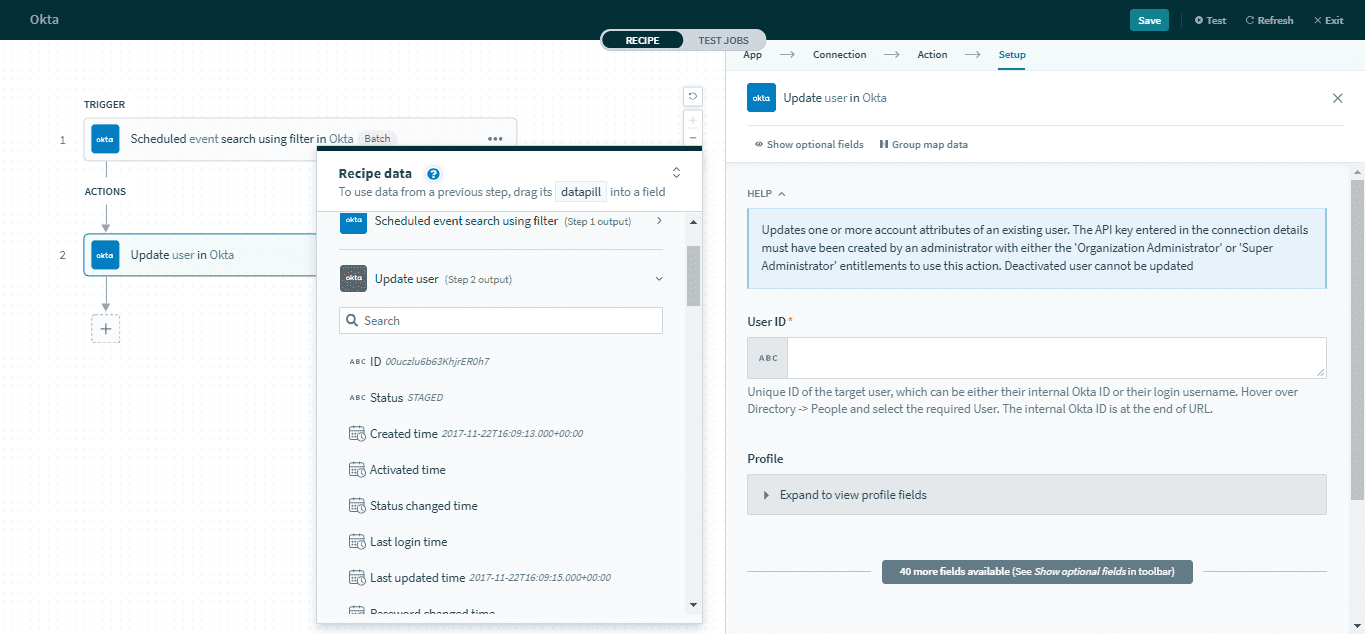 Update user action
Input
The input configuration contains the full set of user properties. Refer to the Okta user object documentation for more information on user properties.
Below are the commonly used user properties.
| Input field | Description | |
|---|---|---|
| User ID | The unique ID of the target user. | |
| Profile | First name | First name for the user. |
| Last name | Last name for the user. | |
| Primary email ID | Primary email address of the user. | |
| Username | A unique identifier for the user. This must be an email. | |
| Title | Title of the user. | |
| Employee number | An organization assigned identifier for the user. | |
| Manager ID | The Okta ID of the user's manager. | |
| Manager | The display name of the user's manager | |
Output
The output datatree contains information about the user like the ID and status.
| Field | Description |
|---|---|
| ID | The unique ID for the user. |
| Status | The current status of the user. |
| Created time | The timestamp when the user was created. |
| Activated time | The timestamp when the user's status was updated to Active. |
| Status changed time | The timestamp when the status was last changed. |
| Last login time | The timestamp when the user was last logged in. |
| Last updated time | The timestamp when the user was last updated. |
| Password changed time | The timestamp when the password was last changed. |
| Profile | This object contains information about the user's profile, including first and last name, email, organization, and title. Refer to the Okta user profile object documentation for more information. |
| Credentials | This object specifies the primary authentication and recovery credentials for the user. It includes the recovery question and credentials provider. |
| Links | This object contains a collection of link relations for the user. It includes lifecycle operations and credentials operations. Refer to the Okta user links object documentation for more information. |
Last updated: