Folders
Use the following endpoints to manage folders and projects (top-level folders) in your workspace:
ENDPOINT ACCESS
To access these endpoints, your API client must have the appropriate privileges. This is determined by the API client role.
To enable endpoint access:
You can enable access to these endpoints by editing an existing API client role, or by creating a new API client role:
Navigate to Workspace admin > API clients > Client roles.
Select the role you plan to edit.
Alternatively, click + Add client role to create a new API client role.
Select Projects and navigate to Project assets > Projects & folders.
Select the checkboxes next to the endpoints you plan to enable for this role. The following options are available:
- Projects & folders
- Select this option to enable all endpoints for this role.
- List projects
GET /api/projects - List folders
GET /api/folders - Create project or folder
POST /api/folders - Delete folder
DELETE /api/folders/:id - Update folder
PUT /api/folders/:id - Delete project
DELETE /api/projects/:id - Update project
PUT /api/projects/:id
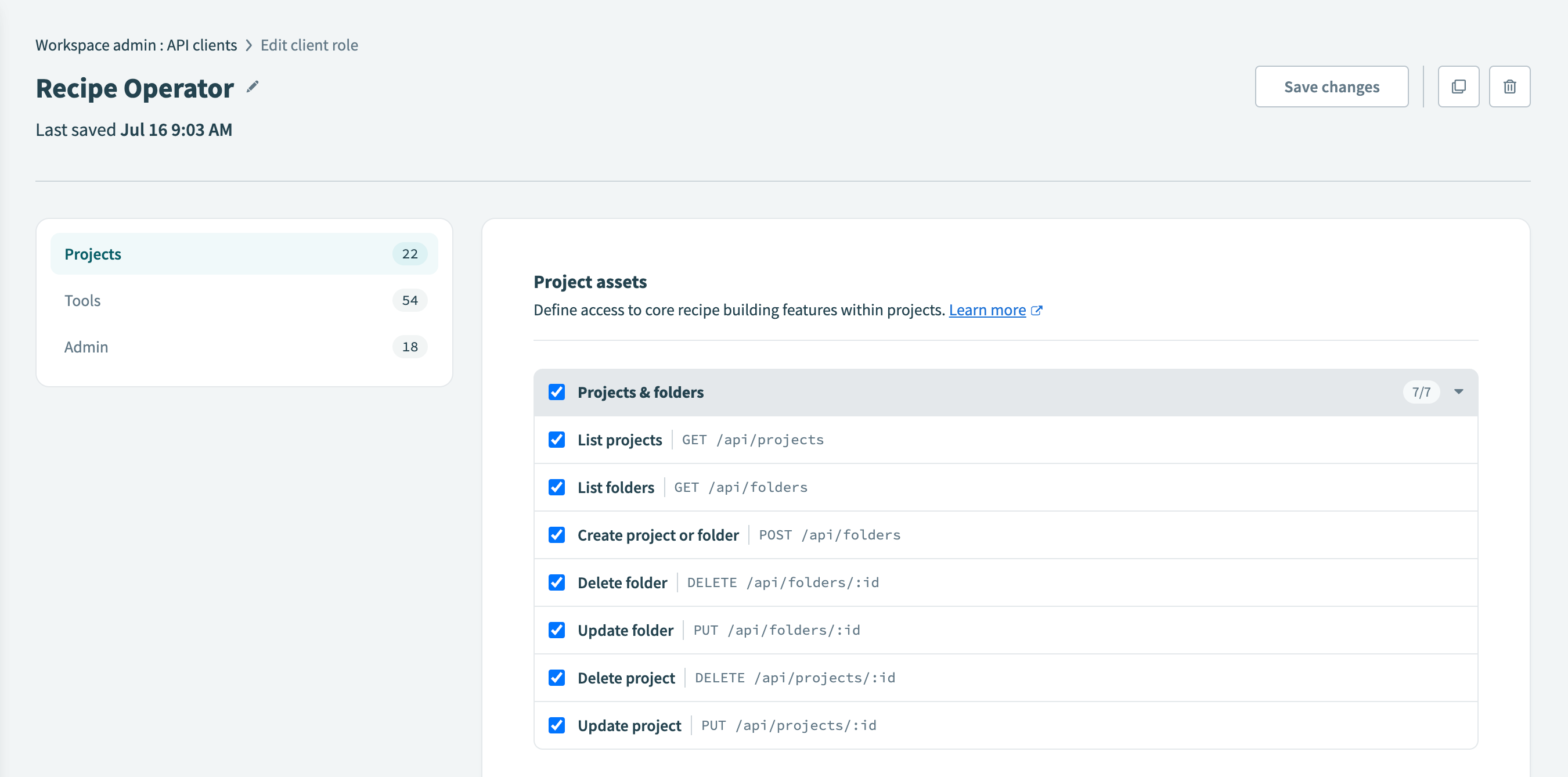 Select the endpoints you plan to enable
Rate limits
Folder resources have the following rate limits:
Quick reference
| Type | Resource | Description |
|---|---|---|
| GET | /api/folders | List folders. |
| GET | /api/projects | List projects. |
| POST | /api/folders | Create a project or folder. |
| PUT | /api/folders/:folder_id | Update a folder. |
| PUT | /api/projects/:project_id | Update a project. |
| DELETE | /api/folders/:folder_id | Delete a folder. |
| DELETE | /api/projects/:project_id | Delete a project. |
List folders
Lists all folders.
GET /api/foldersQuery parameters
| Name | Type | Description |
|---|---|---|
| parent_id | string | Parent folder ID. Defaults to Home folder. |
| page | integer | Page number. Defaults to 1. |
| per_page | integer | Page size. Defaults to 100 (maximum is 100). |
| with_nested_folders | boolean optional | If false, returns all immediate child folders under root, excluding root. The default is false. |
| updated_after | string optional | Filter the list of folders to include only those updated after the date and time you specify. The date and time must be provided in ISO 8601 format according to the following pattern: YYYY-MM-DDTHH:MM:SSZ. |
Sample request
curl  -X GET 'https://www.workato.com/api/folders?parent_id=12323' \
      -H 'Authorization: Bearer <api_token>' \
      -H 'Content-Type: application/json' \
Response
[
    {
        "id": 7498,
        "name": "Netsuite production",
        "parent_id": 3319,
        "is_project": false,
        "project_id": 4567,
        "created_at": "2020-07-31T03:08:29.486-07:00",
        "updated_at": "2020-07-31T03:08:29.493-07:00"
    },
    {
        "id": 7302,
        "name": "Automation HR",
        "parent_id": 3319,
        "is_project": true,
        "project_id": null,
        "created_at": "2020-07-09T14:37:47.789-07:00",
        "updated_at": "2020-07-09T14:37:47.802-07:00"
    }
]
List projects
Lists all projects. Projects are top-level folders that normally encompass a single use case.
GET /api/projectsQuery parameters
| Name | Type | Description |
|---|---|---|
| page | integer | Page number. Defaults to 1. |
| per_page | integer | Page size. Defaults to 100 (maximum is 100). |
| updated_after | string optional | Filter the list of projects to include only those updated after the date and time you specify. The date and time must be provided in ISO 8601 format according to the following pattern: YYYY-MM-DDTHH:MM:SSZ. |
Sample request
curl  -X GET 'https://www.workato.com/api/projects' \
      -H 'Authorization: Bearer <api_token>' \
      -H 'Content-Type: application/json' \
Response
[
    {
        "id": 649122,
        "description": "Coupa to Netsuite automations",
        "folder_id": 1563029,
        "name": "Procure to Pay"
    },
    {
        "id": 604202,
        "description": "Salesforce to Netsuite automations",
        "folder_id": 1486330,
        "name": "Order to Cash"
    },
]
Create a project or folder
Creates a new folder in the specified parent folder. If you do not specify a parent folder ID, the system creates the folder as a top-level folder in the home folder.
POST /api/foldersPayload
| Name | Type | Description |
|---|---|---|
| name | string required | Name of the folder. |
| parent_id | string | Parent folder ID. Defaults to Home folder. |
Sample request
curl  -X POST https://www.workato.com/api/folders \
      -H 'Authorization: Bearer <api_token>' \
      -H 'Content-Type: application/json' \
      -d '{
            "name": "Salesforce folder"
          }'
Response
{
  "id": 3498583,
}
Update a folder
Use this endpoint to update a folder name or move it to a different folder within your workspace. You can change the folder's name and update its parent_id if the folder is not a project. If the folder is a project, you can only change the project name using this endpoint.
Refer to the Update a project endpoint documentation for additional options in the request payload for projects.
PUT /api/folders/:folder_idFOLDER AND PROJECT CONVERSION
You can't use this endpoint to convert a folder into a project or a project into a folder.
URL parameters
| Name | Type | Description |
|---|---|---|
| folder_id | string required | The ID of the folder you plan to update. You can retrieve a list of folder IDs by calling the List folders endpoint. |
Payload
| Name | Type | Description |
|---|---|---|
| name | string optional | The new name for the folder. |
| parent_id | string optional | The ID of the parent folder to which you plan to move the folder. |
FOLDER NAME
The folder name cannot include the / or \ characters.
Sample request
curl  -X PUT https://www.workato.com/api/folders/12345 \
      -H 'Authorization: Bearer <api_token>' \
      -H 'Content-Type: application/json' \
      -d '{
            "name": "My updated folder name",
            "parent_id": 67890
          }'
Responses
Successful response
{
    "id": 12345,
    "name": "My updated folder name",
    "parent_id": 67890,
    "created_at": "2024-08-02T13:35:11.691-07:00",
    "updated_at": "2024-08-02T14:26:30.365-07:00"
}
Unsuccessful responses
Changing the parent folder of a project
Projects are top-level folders. Attempting to change the parent folder of a project returns the following error:
{
    "message": "Parent can't be changed for project folder"
}
Refer to the Update a project endpoint documentation to see the available options for the request payload.
Invalid characters in folder name
Attempting to update a folder name to include the / or \ characters returns the following error:
{
    "message": "Folder name can't contain the folder path"
}
Update a project
Update a project in your workspace. Projects are top-level folders that typically encompass a single use case. Use this endpoint to change a project's name and description.
PUT /api/projects/:project_idFOLDER AND PROJECT CONVERSION
You can't use this endpoint to convert a folder into a project or a project into a folder.
URL parameters
| Name | Type | Description |
|---|---|---|
| project_id | string required | The ID of the project you plan to update. This is distinct from the project's folder_id. Retrieve a list of projects in your workspace by calling the List projects endpoint. |
Payload
| Name | Type | Description |
|---|---|---|
| name | string required | The new name for the project. |
| description | string optional | The new description for the project. |
PROJECT NAME
The project name cannot include the / or \ characters.
Sample request
curl  -X PUT https://www.workato.com/api/projects/54321 \
      -H 'Authorization: Bearer <api_token>' \
      -H 'Content-Type: application/json' \
      -d '{
            "name": "My updated project name",
            "description": "My updated project description"
          }'
Responses
Successful response
{
    "id": 54321,
    "description": "My updated project description",
    "folder_id": 09876,
    "name": "My updated project name"
}
Unsuccessful response
Attempting to update your project name to include the / or \ character returns the following error:
{
    "message": "Name is invalid"
}
Delete a folder
Delete a folder within your workspace.
WARNING
This action deletes a folder and all of its contents (recipes and connections).
To use this endpoint, your API client role must have the following privilege:
- Delete folder
DELETE /api/folders/:id
DELETE /api/folders/:folder_idURL parameters
| Name | Type | Description |
|---|---|---|
| folder_id | string required | The ID of the folder you plan to delete. You can retrieve a list of folder IDs by calling the List folders endpoint. |
Query parameters
| Name | Type | Description |
|---|---|---|
| force | boolean optional | Set this parameter to true to delete a folder that is not empty. When true, the folder you specify using the folder_id parameter, and its contents (all recipes and connections) within the folder are deleted. If set to false, this action can only delete an empty folder. |
Sample request
curl  -X DELETE 'https://www.workato.com/api/folders/12345?force=true' \
      -H 'Authorization: Bearer <api_token>'
Response
Successful response
{
    "success": "true"
}
Unsuccessful response
If you attempt to delete a folder that isn't empty, but do not set the force parameter to true Workato cannot delete the folder you've specified.
If the folder contains a connection, Workato provides the following response:
{
    "message": "can't remove a folder with connections"
}
If the folder contains a recipe, Workato provides the following response:
{
    "message": "can't remove a folder with recipe"
}
Delete a project
Delete a project within your workspace. Projects are top-level folders that typically encompass a single use case.
WARNING
This action deletes a project and all of its contents. This includes all child folders, recipes, connections, and Workflow apps assets (if applicable) inside the project.
To use this endpoint, your API client role must have the following privilege:
- Delete projects
DELETE /api/projects/:id
DELETE /api/projects/:project_idURL parameters
| Name | Type | Description |
|---|---|---|
| project_id | string required | The ID of the project you plan to delete. Retrieve a list of all projects in your workspace by calling the List projects endpoint. |
Sample request
curl  -X DELETE 'https://www.workato.com/api/projects/54321' \
      -H 'Authorization: Bearer <api_token>'
Response
Successful response
{
    "success": "true"
}
Unsuccessful response
If you attempt to delete a project and do not have the appropriate privileges, Workato returns the following response.
{
    "message": "Cannot destroy folder"
}Last updated: