Google Drive - Add file permission action
This action adds a permission to a particular file in Google Drive. Permissions are useful to transfer file ownership or to share a file with specific users, groups, or domains, or to make it accessible to anyone.
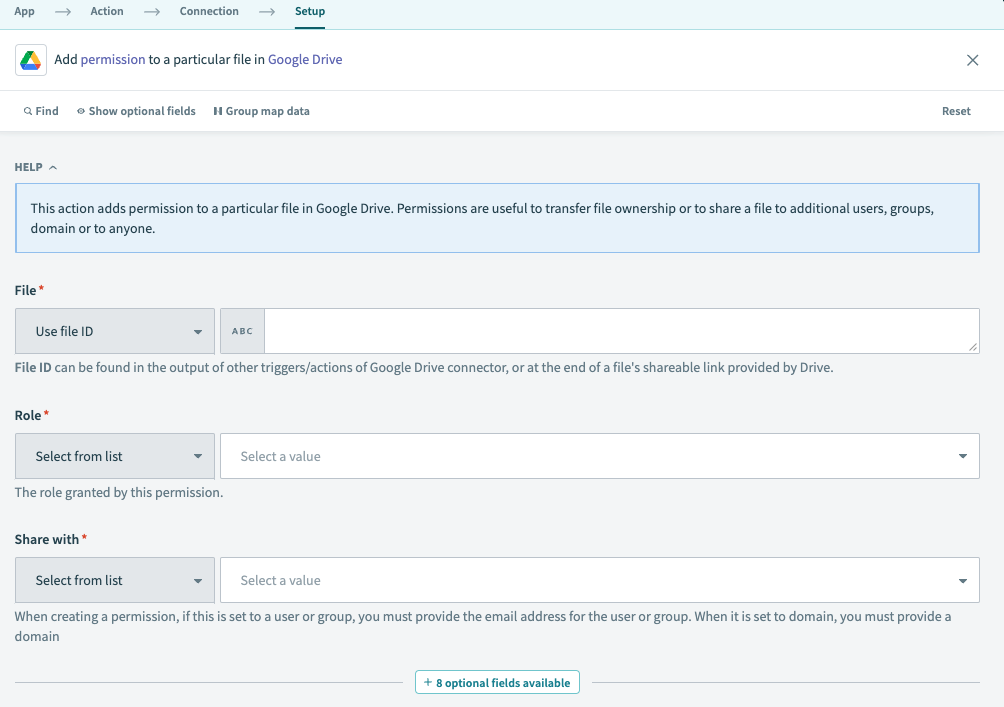 Google Drive Add file permission action
Input
| Input fields | Description |
|---|---|
| File | The file you plan to add permission to. Select a file or enter its ID. To find the file ID, right-click the file and select Share > Copy link. For example, if the URL is https://drive.google.com/file/d/123nyR2IjW_Rq84d3qEYRoq1/view, the file ID is 123nyR2IjW_Rq84d3qEYRoq1. Alternatively, you can find the file ID in the output of other Google Drive triggers and actions. |
| Role | The role granted by this permission. Select a role or use a custom value. Allowed values: owner, organizer, fileOrganizer, writer, commenter, reader. |
| Share with | Who to grant the permission to. Select an entity or use a custom value. If this is set to a user or group, you must provide their email address. If it is set to a domain, you must provide a domain. Allowed values: user, group, domain, anyone. |
| Email address | Email address of the specific user or group the permission refers to. Required if Share with is set to user or group. |
| Domain | Domain the permission refers to. Required if Share with is set to domain. |
| Allow file discovery? | Determines if a file can be discovered through search. This is only applicable to permissions granted to domain or anyone. Defaults to Yes. |
| Send notifications | Determines if a notification is sent to a user or group about the permission. Not applicable if the file is shared to domain or anyone. Defaults to Yes for users and groups. |
| Notification message | A plain text custom message to include in the notification email. |
| Transfer ownership | Transfer ownership of the file to the user provided. Requires Share with to be set to user and Role to be set as owner. Defaults to No. |
| Move file to root of the user | Moves the file to the new owner's root folder. Requires Transfer ownership to be set to Yes. Defaults to No. |
| Use domain admin access? | Issues the request as a domain administrator, if the connected user is the admin of the domain owning a shared drive. This setting allows the domain admin to set permissions for shared drive files owned by their domain even if they aren't a member of the given shared drive. Default is set to No. |
Output
| Output fields | Description |
|---|---|
| Kind | The kind of resource this is: drive#permission |
| Type | The type of grantee: user, group, domain, or anyone. |
| Permission ID | The ID of this permission. |
| Email address | The email address of the user or group that was granted this permission. |
| Domain | The domain this permission refers to. |
| Role | The role granted by this permission. |
| View | The view for this permission. |
| Allow file discovery | Indicates whether this permission allows the file to be discovered through search. This is only applicable to permissions granted to domain or anyone. |
| Display name | The human-readable name for the permission grantee. user: User's full name. group: Name of the Google Group. Domain: Domain owning the shared drive. Not applicable to the type anyone. |
| Photo link | A link to the user's profile photo, if available. |
| Team Drive permission details | A list of permission details for the Team Drive. Contains the following output fields, in addition to List size and List index:
|
| Permission details | A list of permission details for the shared drive. Contains the following output fields, in addition to List size and List index:
|
| Deleted | Whether the account associated with this permission has been deleted. This field only applies to user and group permissions. |
Last updated: