Google Drive - Copy file action
This action copies a file from a source folder to a destination folder in Google Drive. Google Drive does not support copying folders.
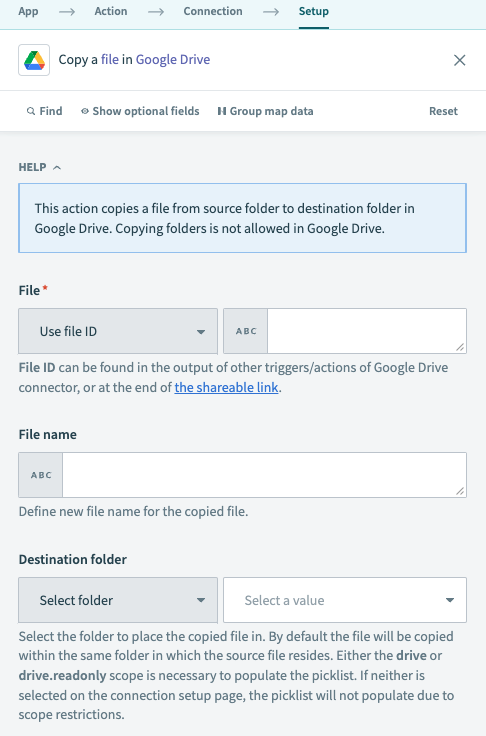 Google Drive Copy file action
Input
| Input field | Description |
|---|---|
| File | The file you plan to copy. Select a file or enter its ID. To find the file ID, right-click the file and select Share > Copy link. For example, if the URL is https://drive.google.com/file/d/123nyR2IjW_Rq84d3qEYRoq1/view, the file ID is 123nyR2IjW_Rq84d3qEYRoq1. Alternatively, you can find the file ID in the output of other Google Drive triggers and actions. |
| File name | The name for the newly copied file. |
| Destination folder | The folder you plan to place the newly copied file in. Select a folder or enter its ID. You can find the folder ID at the end of the folder URL. If entering the folder ID for a shared drive (formerly Team Drive), this value must be in the form folder_id/shared_drive_id (for example, 1fm6iCMYrN7roZZ-ynpVFRTVq9mellrWp/0AB6ZFCw3XdamUk9PAA).By default, the copied file is placed in the same folder as the source file. |
Output
| Output field | Description |
|---|---|
| Kind | The kind of resource this is: drive#file. |
| Name | The name of the newly copied file. |
| File ID | The ID of the file. |
| MIME type | The MIME type of the file, as stated in Google Drive's documentation. |
| Parents | The list of parent folder IDs that contain the file, including the List size and List index. |
Last updated: