Zendesk - Ticket fields
Zendesk tickets contain various ticket fields that add information about the ticket. Some fields are required inputs by the requester (for example, Subject), while some fields are outputs generated by the system (for example, Ticket ID).
Ticket input fields
To view the full list of ticket fields, go to settings > under Manage > Ticket Fields.
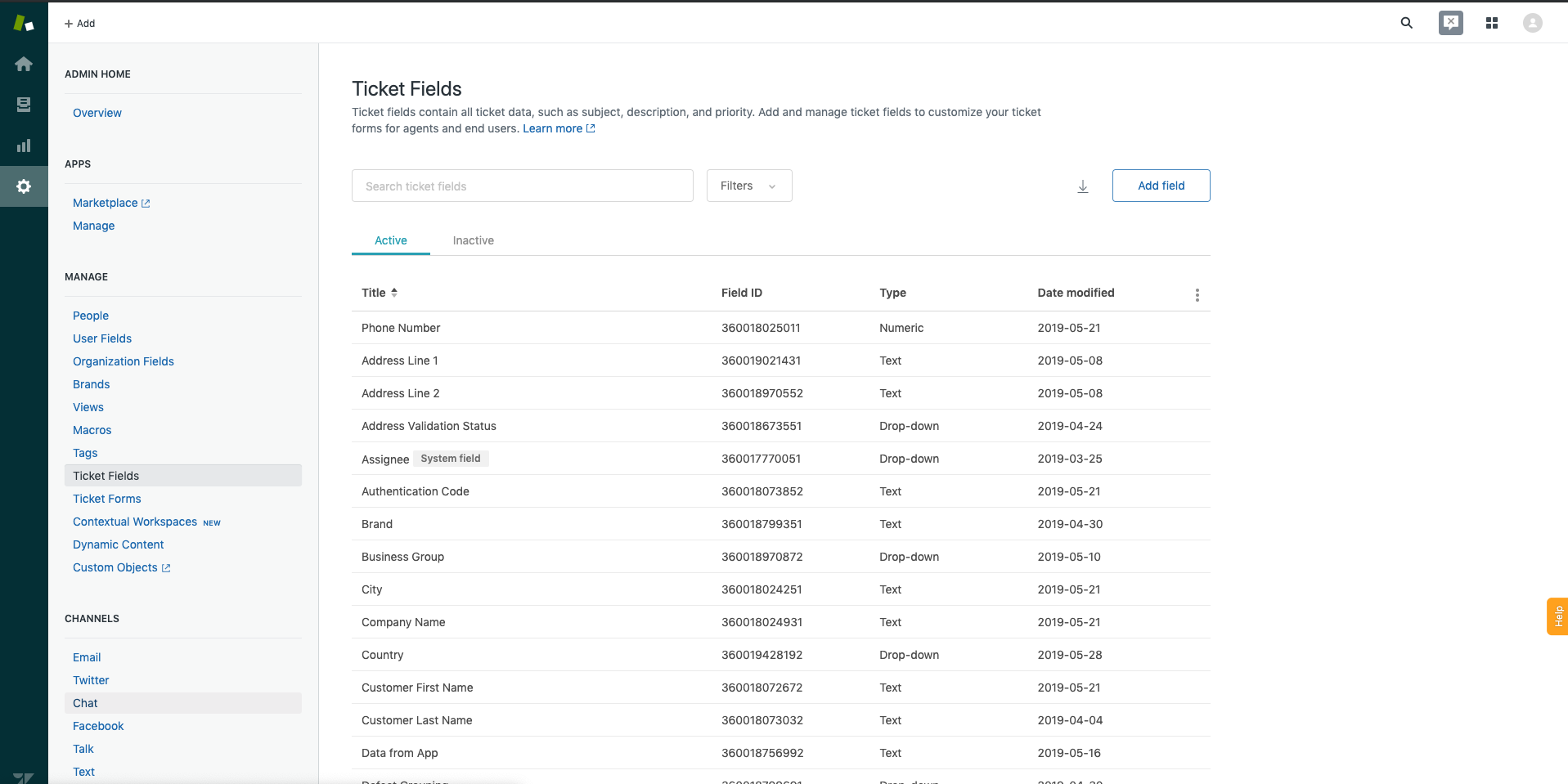 Ticket fields
Ticket default input fields
Zendesk's out-of-the-box ticket fields gather basic information. At default, only "subject" and "comment" is configured as mandatory.
| Input field | Description |
|---|---|
| Ticket form | Select a ticket form to use preconfigured custom fields. |
| Subject | The subject of the ticket. |
| Description | The description of the ticket. |
| Type | The type of ticket. Permitted values are problem, incident, question, or task. |
| Priority | The priority of the ticket. Permitted values are urgent, high, normal, or low. |
| External ID | A unique identifier from another system. |
| Status | The status of the ticket. Permitted values are open, pending, hold, solved, or closed. |
| Requester ID | The unique Zendesk ID of the user who requested this ticket. |
| Submitter ID | The unique Zendesk ID of the user who submitted the ticket. An Agent can submit a ticket on behalf of a customer (requester). |
| Assignee ID | The unique Zendesk ID of the Agent assigned to the ticket. |
| Organization ID | The unique Zendesk ID of the requester's organization. |
| Group ID | The unique Zendesk ID of the group assigned to the ticket. |
| Forum topic ID | The topic this ticket originated from. |
| Recipient email address | The email of the original recipient of the ticket. |
| Has incidents | Select Yes to mark this ticket as a problem, otherwise select No. |
| Due at | Only applied if the ticket is a task type. The due date of the ticket. |
| Tags | The tags applied to this ticket. You can add multiple tags with the , separator. |
Ticket custom input field
Aside from the preconfigured fields, Zendesk allows you to customize ticket fields to suit your business use-cases. Below is an example of ticket custom fields.
| Ticket custom field | Field type | Mandatory |
|---|---|---|
| Department | Drop-down (list) | Yes |
| Linked to product ID | Numeric (int) | Yes |
| Product short name | Text (string) | No |
| Occurred before | Checkbox (boolean) | Yes |
| Date of last incident | Date (date) | No |
Ticket output fields
Some ticket fields are manual inputs (for example, Subject), while others are generated by the system (for example, Ticket ID).
Ticket default output fields
Depending on the field configuration, some fields might have null or default values.
| Input field | Description |
|---|---|
| Ticket ID | The unique Zendesk ID of the ticket. This is automatically assigned when the ticket is created. |
| Subject | The subject of the ticket. |
| Type | The type of ticket. Permitted values are problem, incident, question, or task. |
| Priority | The priority of the ticket. Permitted values are urgent, high, normal, or low. |
| External ID | A unique identifier from another system. |
| Status | The status of the ticket. Permitted values are open, pending, hold, solved, or closed. |
| Requester ID | The unique Zendesk ID of the user who requested the ticket. |
| Submitter ID | The unique Zendesk ID of the user who submitted the ticket. |
| Assignee ID | The unique Zendesk ID of the Agent assigned to the ticket. |
| Organization ID | The unique Zendesk ID of the organization of the requester. |
| Group ID | The unique Zendesk ID of the group assigned to the ticket. |
| Forum topic ID | The topic this ticket originated from. |
| Recipient email address | The email of the original recipient of the ticket. |
| Has incidents | Is True if this ticket has been marked as a problem, otherwise it will display False. |
| Due at | The due date of the ticket. |
| Tags | The tags applied to this ticket. You can add multiple tags with the , separator. |
| Ticket form ID | The unique Zendesk ID of the ticket form associated with this request. |
| Via: Channel | Information about how the ticket was created. Some possible values are "web", "mobile", "API" etc. |
| Via: Source | Only for follow-up tickets. This shows the unique Zendesk ID of a closed ticket. |
| Description | The description of the ticket. |
| Ticket URL | The API URL of this ticket. |
| Date created | The time this ticket was created. |
| Date updated | The time this ticket was last updated. |
Ticket custom output fields
If you have configured ticket custom fields, you can retrieve the corresponding output. Below is an example of ticket custom output fields.
| Ticket custom field | Field type | Output |
|---|---|---|
| Department | Drop-down (list) | Sales |
| Product ID | Numeric (int) | 86415a8e-8282-11e9-a9fa-a53f472c6300 |
| Product short name | Text (string) | MX Mouse F3 |
| Occurred before | Checkbox (boolean) | True |
| Date of last incident | Date (date) | 2019-05-30T11:04:06.000+08:00 |
Last updated: