Zendesk - User fields
Zendesk user contains various user fields that add information about the user. Some fields are required inputs by the creator (for example, Name), while some fields are outputs generated by the system (for example, User ID).
User input fields
To register a new user in your Zendesk instance, you are required to fill up certain information about the user. This includes identifying information like the name and email, and permission controls.
User default input fields
Zendesk's out-of-the-box user fields gather basic information. At default, only name is configured as mandatory.
| Input field | Description |
|---|---|
| Name | The name of the user. |
| Role | The role of the user. Permitted values are End-user, Agent, or Administrator. |
Mandatory if the user's role is designated as Agent. The primary email of the user. | |
| Organization ID | The unique Zendesk ID of the user's organization. |
| External ID | A unique identifier from another system. |
| Signature | Only for Agent and Administrator users. The signature of the user. |
| Phone | The primary phone number of the user. |
| Details | Details about the user. |
| Notes | Notes about the users. |
| Active | Select Yes if the user exists and has access to Zendesk, otherwise select No. |
| Verified | Select Yes of the user's primary identity is verified, otherwise select No. |
| Shared | Select Yes if the user is shared from a different Zendesk support instance, otherwise select No. |
| Locale | The locale of the user. |
| Language | The language of the user. |
| Timezone | The timezone of the user. |
| Ticket restrictions | Specifies which tickets the user has access to. Some possible values are "organization", "assigned", null etc. |
| Moderator | Select Yes if the user has forum moderation capabilities, otherwise select No. |
| Only private comments | Select Yes if the user can only create private comments, otherwise select No. |
| Tags | The tags applied to this user. You can add multiple tags with the , separator. |
| Alias | Only for Agent users. The alias displayed to end-users. |
| Custom role ID | Only for Agent users on Zendesk enterprise plan. The custom role ID for this user. |
| Restricted agent | Only for Agent users. Select Yes if the user has any restrictions, otherwise select No. |
| Suspended | Only for Agent users. Select Yes if the user is suspended, otherwise select No. |
| Shared agent | Select Yes if the user is a shared agent from a different Zendesk support instance, otherwise select No. |
User custom input field
Aside from the preconfigured user fields, Zendesk allows you to customize user fields to suit your business use-cases.
To view this list of user custom fields, go to settings > under Manage > User Fields.
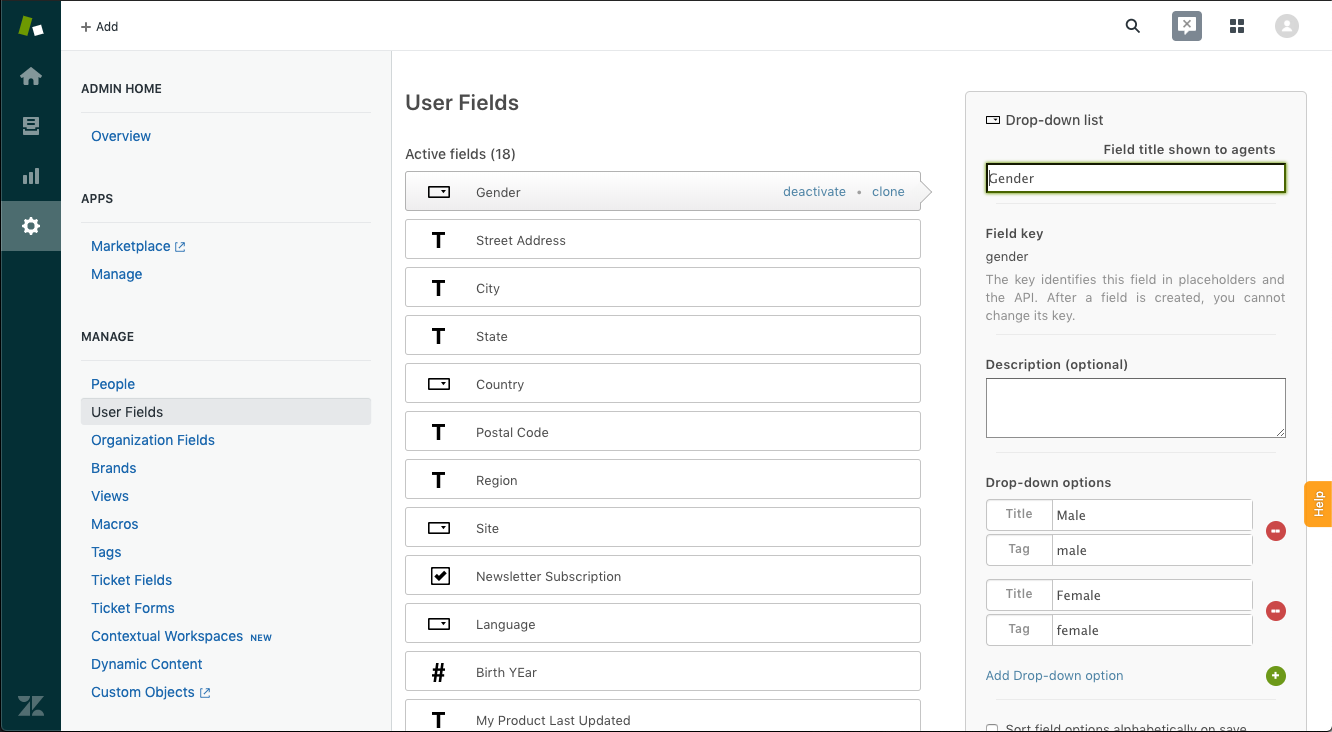 User custom fields
Below is an example of user custom fields.
| User custom field | Field type | Mandatory |
|---|---|---|
| Gender | Drop-down (list) | Yes |
| Street address | Text (string) | No |
| Newsletter Subscription | Checkbox (boolean) | Yes |
User output fields
Some user fields are manual inputs (for example, Name), while others are generated by the system (for example, User ID).
User default outputs fields
Depending on the field configuration, some fields might have null or default values.
| Output field | Description |
|---|---|
| Name | The name of the user. |
| Role | The role of the user. Permitted values are End-user, Agent, or Administrator. |
| The primary email of the user. | |
| Organization ID | The unique Zendesk ID of the user's organization. If the user has more than one organization membership, it will display the user's default organization. |
| External ID | A unique identifier from another system. |
| Signature | The signature of the user. |
| Phone | The primary phone number of the user. |
| Details | Details about the user. |
| Notes | Notes about the users. |
| Active | Set to True by default. It will display False if the user has been deleted. |
| Verified | Is True if the user's primary identity is verified, otherwise it will display False. |
| Shared | Is True if the user is shared from a different Zendesk support instance, otherwise it will display False. |
| Locale | The locale of the user. |
| Language | The language of the user. It is displayed as an int. |
| Timezone | The timezone of the user. |
| Ticket restrictions | Specifies which tickets the user has access to. |
| Moderator | Is True if the user has forum moderation capabilities, otherwise it will display False. |
| Only private comments | Is True if the user can only create private comments, otherwise it will display False. |
| Tags | The tags applied to this user. |
| Tags list | A predefined list of tags that can be applied to this user. |
| ID | The unique Zendesk ID of the user. This is automatically assigned when the user is created. |
| URL | The API URL for this user. |
| Date created | The time the user was created. |
| Date updated | The time the user was last updated. |
| Last login date | The time the user was last logged in. |
| Alias | The alias displayed to end-users. |
| Custom role ID | The custom role ID for this user. |
| Restricted agent | Is True if the user has any restrictions, otherwise it will display False. |
| Suspended | Is True if the user is suspended, otherwise it will display False. |
| Shared agent | Is True if the user is a shared agent from a different Zendesk support instance, otherwise it will display False. |
User custom output fields
If you have configured a user custom field, you can retrieve the corresponding output. Below is an example of user custom output fields.
| User custom field | Field type | Output |
|---|---|---|
| Gender | Drop-down (list) | Male |
| Street address | Text (string) | Waters Park Drive |
| Newsletter Subscription | Checkbox (boolean) | False |
Last updated: