Zendesk - Create/update record action
This action identifies specific records in your Zendesk instance and updates them. Tickets will be identified with their unique Zendesk ID. For Organization and Users, email, and external ID can be used.
For existing records, this action will update the record with the data provided. If no records are found, it will create a new record.
This action accepts a list of maximum of 100 records.
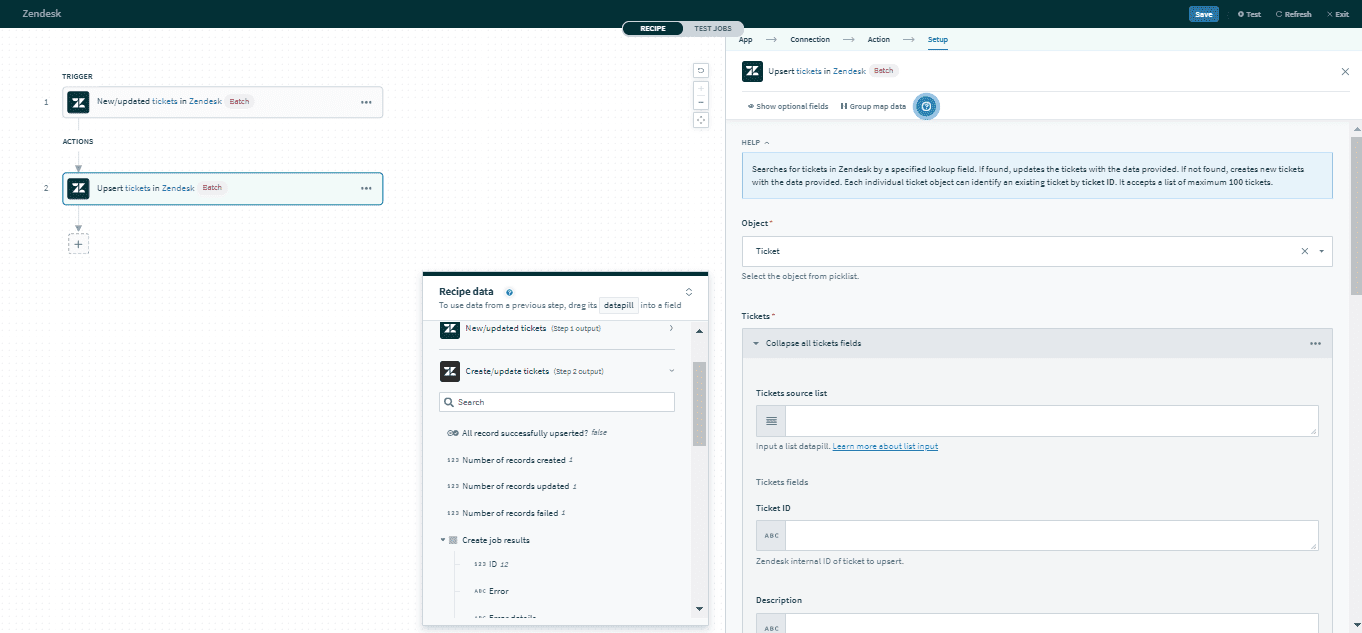 Create/update record action
Input field
| Input field | Description |
|---|---|
| Object | Select the object to be monitored - User, Ticket, or Organization. |
Object input | The input fields for the object you have selected. See below. |
| Wait for Zendesk to process all records | Select Yes to wait for the action to complete before moving to the next action. You can use the status messages in subsequent steps. See here. Otherwise, select No. The recipe will move to the next step once Zendesk starts processing. |
Click here for a full list of user inputs, ticket inputs, or organization inputs.
Output field
If you selected to wait for the action to complete before moving to the next step, you will be able to use the following datapills from the output.
| Output field | Description |
|---|---|
| All records successfully upserted? | This returns True if all records have been successfully processed. |
| Number of records created | The number of records created. |
| Number of records updated | The number of records updated. |
| Number of records failed | The number of records that failed to be processed successfully. |
| Create job results | An array of records created with this action. The full list of object attributes will be returned for each record. |
| Update job results | An array of records updated with this action. The full list of object attributes will be returned for each record. |
| Failed job results | An array of records that failed to be processed successfully. The full list of object attributes will be returned for each record. |
Click here for a full list of user outputs, ticket outputs, or organization outputs.
VARIABLE OUTPUT
Workato generates an array of Zendesk IDs for all records if you select No in the Wait for Zendesk to process all records field. You can view the output array for this action in the Jobs tab.
Last updated: