Activity audit log reference
This guide provides a comprehensive list of activities recorded in activity audit logs, organized into categories such as account management, connections, API collections, and workflow apps.
Account activities
Activities related to the Workato account, including user logins, password and email updates, account setting modifications, and actions related to Embedded customer workspaces. Each activity indicates whether it applies to Embedded workspaces, direct use cases, or both.
| Activity | Description | Activity type |
|---|---|---|
| User login | User logged in through SSO or using a password. See an example. | Embedded and direct |
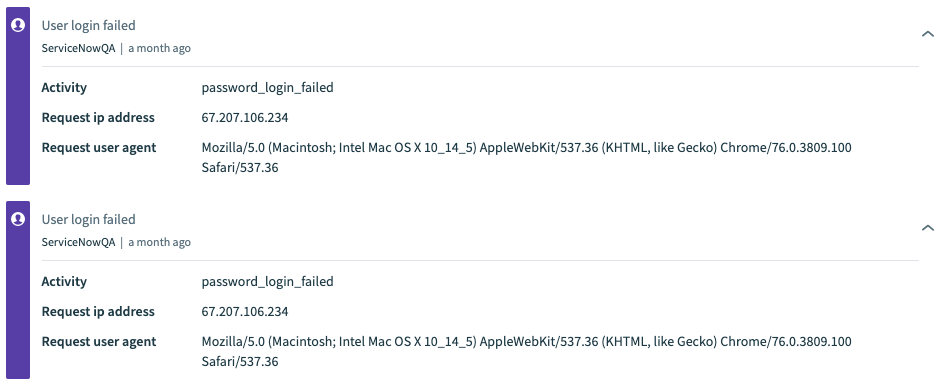
| User login failed | User login attempt failed. Select the activity to find out if the user was logging in through SSO or using a password. See an example. | Embedded and direct |
| User logout | User logged out of Workato. | Embedded and direct |
| Password changed | User changed their password by going to Profile settings > Password. | Embedded and direct |
| User switched workspaces | User switched to another workspace. In audit logs for the workspace the user switched to, this is shown as User login. Select the activity to view the value of the Activity attribute in the details section; a value of switch_workspace indicates the user switched to another workspace. | Embedded and direct |
| Account email updated | User updated their email by going to Profile settings > Profile and modifying the Account email field. | Embedded and direct |
| User name updated | User updated their username by going to Profile settings > Profile and modifying the Name field. | Embedded and direct |
| Password reset requested | User requested to reset their password by clicking Forgot password? during login. In the next screen, by providing the email and clicking the Reset password user confirms the intent to reset their password. | Embedded and direct |
| Enabled two-factor authentication | User enabled two-factor authentication by going to Profile settings > Two-factor authentication. | Embedded and direct |
| Disabled two-factor authentication | User disabled two-factor authentication by going to Profile settings > Two-factor authentication and clicking Disable two-factor authentication. | Embedded and direct |
| Viewed two-factor authentication recovery codes | User viewed the two-factor authentication recovery codes by going to Profile settings > Two-factor authentication and clicking View recovery codes. | Embedded and direct |
| API key refreshed | User refreshed the API token used to connect to Workato platform APIs by going to Workspace admin > API clients, selecting their API client, and regenerating their API token. | Embedded and direct |
| Error notifications email updated | User updated the list of emails receiving error notifications from Workato by going to Workspace admin > Settings > Error alerts and entering emails in the Recipients field. | Embedded and direct |
| Error notification throttling | User enabled or disabled notification throttling by going to Workspace admin > Settings > Error alerts and clicking the Limit error alerts to one per hour for each recipe toggle. | Embedded and direct |
| Audit log streaming | User enabled or disabled audit log streaming. You can configure this setting by going to Workspace admin > Settings > Log streaming. Additionally, the Workato system automatically disables audit log streaming if it detects that the ALR (Audit Log Receiver) connection has been manually disconnected by a user in the workspace for more than eight (8) hours. | Embedded and direct |
| Audit log streaming data inclusion | User updated audit log streaming contents by selecting or deselecting one or more options under Choose events to stream in Workspace admin > Settings > Log streaming. | Embedded and direct |
| Audit log streaming destination updated | User updated the destination where streaming audit logs are sent by going to Workspace admin > Settings > Log streaming and updating the Audit log destination field. | Embedded and direct |
| Authentication method updated | The authentication method for the workspace was updated by going to Workspace admin > Settings > Login methods. Available authentication methods include Workato authentication (no additional authentication), SAML SSO, and Two Factor Authentication. | Embedded and direct |
| SAML SSO setting saved | SAML SSO configuration is successfully configured, verified, and saved by a user in Workspace admin > Settings > Login methods. Available SAML providers include Okta, OneLogin, and other SAML IdP. | Embedded and direct |
| SAML SSO enforcement enabled | A user enabled SAML SSO enforcement for the workspace by navigating to Workspace admin > Settings > Login methods and toggling Enforce SAML authentication for all users. | Embedded and direct |
| SAML SSO enforcement disabled | A user disabled SAML SSO enforcement for the workspace by navigating to Workspace admin > Settings > Login methods and toggling Enforce SAML authentication for all users. | Embedded and direct |
| Roles sync via SAML SSO enabled | A user enabled roles sync via SAML SSO for the workspace by navigating to Workspace admin > Settings > Login methods and toggling Enable role syncing. | Embedded and direct |
| Roles sync via SAML SSO disabled | A user disabled roles sync via SAML SSO for the workspace by navigating to Workspace admin > Settings > Login methods and toggling Enable role syncing. | Embedded and direct |
| SAML SSO Just-in-time (JIT) provisioning enabled | SAML SSO Just-in-time (JIT) provisioning was enabled for the workspace by going to Workspace admin > Settings > Login methods and toggling Enable SAML JIT provisioning. | Embedded and direct |
| SAML SSO Just-in-time (JIT) provisioning disabled | SAML SSO Just-in-time (JIT) provisioning was disabled for the workspace by going to Workspace admin > Settings > Login methods and toggling Enable SAML JIT provisioning. | Embedded and direct |
| Environment switched | User switched to another AHQ Environment (DEV, PROD, or TEST). This information is only visible from your organization's DEV Environment. | Embedded and direct |
| Workspace created | An Embedded customer workspace was provisioned. | Embedded only |
| Environment provisioned | Environments were enabled for a specific customer workspace. | Embedded and direct |
| Plan detail updated | The usage plan details were updated, such as a change in the plan type, limits, or trial account configuration. | Embedded only |
| App access updated | App access for an Embedded customer workspace was updated. | Embedded and direct |
| Custom OAuth profile assignment created | A custom OAuth profile was assigned to a customer workspace. | Embedded only |
| Custom OAuth profile assignment created (environments) | A custom OAuth profile was assigned to a specific environment within a customer workspace. | Embedded only |
| Custom OAuth profile assignment removed | A custom OAuth profile assignment was removed from a customer workspace. | Embedded only |
| Custom OAuth profile assignment removed (environments) | A custom OAuth profile assignment was removed from a specific environment within a customer workspace. | Embedded only |
| External ID updated | The external ID for a customer workspace was updated. | Embedded only |
| External ID updated (environments) | The external ID for a specific environment within a customer workspace was updated. | Embedded only |
| Embedding configuration updated | The origin URL or frame ancestor settings for an Embedded customer workspace were updated. | Embedded only |
| Workspace deleted | An Embedded customer workspace was deleted. | Embedded only |
| Workspace deleted (environments) | A specific environment within a customer workspace was deleted. | Embedded only |
| Customer manager assigned | A customer manager was created and assigned to customer workspace(s). | Embedded only |
| Customer manager removed | A customer manager was removed from customer workspace(s). | Embedded only |
| Customer manager updated | A customer manager assignment was updated. | Embedded only |
| Shared connector deployed | A shared connector was deployed to customer workspaces. | Embedded and direct |
| Shared connector redeployed | A shared connector was redeployed with an updated version to customer workspaces. | Embedded and direct |
| Shared connector removed | A shared connector was removed from customer workspaces. | Embedded and direct |
| Enabled audit log streaming | Audit log streaming was enabled in the Admin console for all customer workspaces. | Embedded only |
| Branding updated | The branding of admin and customer workspaces was updated. | Embedded only |
User login example

User login failed example
Workspace activities
Activities related to Workspace collaborators, including collaborator invitations, roles, and member modifications.
| Activity | Description |
|---|---|
| Invite created | User invited a collaborator by going to Workspace admin > Access control > Collaborators and clicking Invite collaborator. See an example. |
| Invite accepted | User accepted the invite to join the workspace by clicking the Accept invite button in the invitation email. See an example. |
| Invite modified | User modified the invitation in the Workspace admin > Access control > Pending invitations tab. |
| Invite canceled | User canceled the invitation sent to a collaborator by clicking the Delete button in the Workspace > Collaborators > Pending invitations tab. |
| Role updated | User updated a collaborator's role by going to Workspace admin > Access control > Collaborator roles and changing the role. |
| Member deleted | User deleted a workspace member by clicking the Delete button in the Workspace admin > Access control > Collaborators tab. |
| Role created | User added a new custom role by going to Workspace admin > Access control > Collaborator roles and clicking Add new role. |
| Permissions changed for role | User changed the permissions for a custom role by going to Workspace admin > Access control > Collaborator roles, selecting a custom role and editing the role's permissions. You can view the updated and previous permissions in JSON format by copying them from the activity log and pasting them into a text editor. See an example. |
| Role deleted | User deleted a custom role by going to the Workspace admin > Access control > Collaborator roles tab and clicking the Delete button. |
| Workspace name changed | User changed the name of the workspace by going to Workspace admin > Settings > General and editing the Workspace name field. |
Invite created example

Invite accepted example

Updated custom role permissions example
You can view the updated and previous permissions of a custom role by clicking Copy. You can then paste the copied JSON into a text editor or other application to view the permissions.

Recipe activities
Activities related to recipes.
| Activity | Description |
|---|---|
| Started | User started a recipe by clicking the Start recipe button from the Recipe details page. The activity log includes the folder path where the recipe was started. |
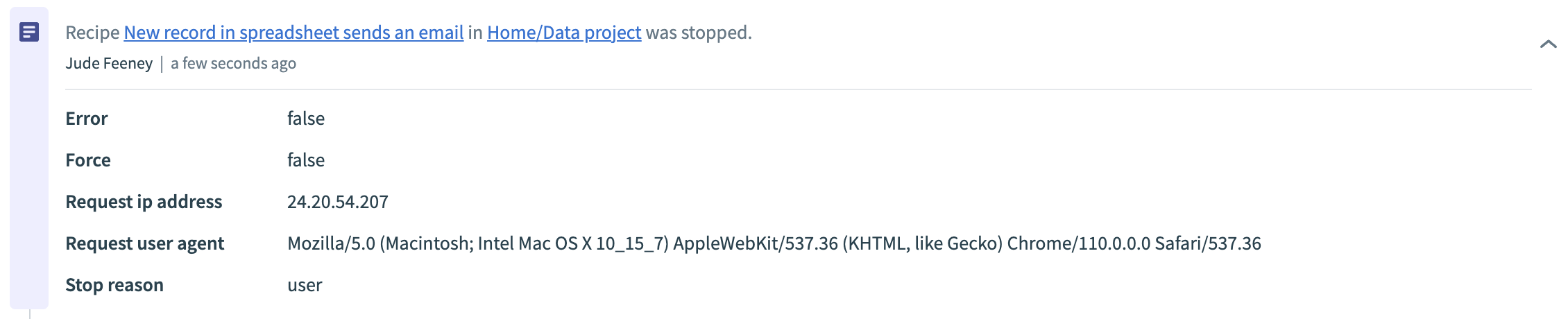
| Stopped | User stopped a recipe by clicking the Stop recipe button from the Recipe details page. See an example The activity log includes the folder path where the recipe was stopped. |
| Created | User created a new recipe by clicking Create > Recipe. The activity log includes the folder name where the recipe was created. The activity log includes the folder path where the recipe was created. |
| Edited | User modified a recipe by going to the Recipe details page, editing, and saving the recipe. The activity log includes the folder path where the recipe was edited. |
| Renamed | User renamed a recipe by clicking the recipe title, editing, and saving it. The activity log includes the folder path where the recipe was renamed. |
| Moved | User moved a recipe from one folder to another by dragging and dropping the recipe from the Recipes page. The activity audit log includes the folder path where the recipe was moved to and from. |
| Cloned/Copied | User cloned a recipe by clicking ... > Clone recipe in the Recipes page or clicking the Copy button in the Recipe details page. The activity log includes the folder path where the recipe was copied/cloned. |
| Access scope updated | User updated the access scope (public or private) of a recipe by toggling the Is this a public recipe setting found in the Recipe details > Settings tab. The activity audit log includes the folder path where the recipe's access scope was updated. |
| Deleted | User deleted a recipe by clicking ... (ellipsis) > Delete recipe in the Recipes page or clicking the Delete button in the Recipe details page. The activity log includes the folder name where the recipe was deleted. |
| Tag added to recipe | User added one or more tags to a recipe. |
| Tag removed from recipe | User removed one or more tags from a recipe. |
Recipe stopped example
Connection activities
Activities related to connections.
| Activity | Description |
|---|---|
| Connection created | User created a new connection by clicking Create > Connection. The activity log includes the folder name where the connection was created. |
| Connection edited | User edited an existing connection by going to the Connections page or the Recipe details > Connections tab, disconnecting the connection, and then modifying its settings. The activity log includes the folder name where the connection was edited. |
| Connection connected | User connected an account to or provided credentials for a connection in its Connection settings page. The activity log includes the folder name where the connection was connected. |
| Connection disconnected | User disconnected a connection by clicking the Disconnect button in its Connection settings page. See an example. The activity log includes the folder name where the connection was created. |
| Connection deleted | User deleted a connection by going to Connections, selecting a connection, and clicking Delete connection. The activity log includes the folder name where the connection was deleted. |
| Connection moved | User moved a connection from one folder into another folder by dragging and dropping it to a new destination. The activity log includes the folder name where the connection was moved to and from. |
| Tag added to connection | User added one or more tags to a connection. |
| Tag removed from connection | User removed one or more tags from a connection. |
Connection disconnected example

Tag activities
Activities related to tags.
| Activity | Description |
|---|---|
| Tag created | User created a new tag. |
| Tag deleted | User deleted an existing tag. |
| Tag updated | User modified an existing tag by editing properties such as the tag name, color, or description. |
Tag created example
 Tag created
Folder activities
Activities related to folders.
| Activity | Description |
|---|---|
| Folder created | User created a new folder by clicking Create > Folder. See an example. |
| Folder deleted | User deleted a folder by clicking ... (ellipsis) on the folder and selecting Delete from the menu. See an example. |
| Folder renamed | User renamed a folder by clicking ... (ellipsis) on the folder and selecting Rename from the menu. |
| Folder moved | User moved a folder by dragging and dropping it to a new destination. |
Folder created example

Folder deleted example

Package activities
Activities related to Recipe lifecycle management manifests and packages and deployments across Environments.
| Activity | Description |
|---|---|
| Manifest created | User created a new manifest by going to Tools > Recipe lifecycle management and clicking Create new manifest. |
| Manifest updated | User updated an existing manifest by going to Tools > Recipe lifecycle management > Export tab, selecting a manifest, and clicking the Edit manifest button. |
| Manifest deleted | User deleted a manifest by going to Tools > Recipe lifecycle management > Export tab, selecting a manifest, and clicking ... > Delete manifest. |
| Package exported | User exported a package by going to the Recipe lifecycle management page and creating, building, and packaging the manifest to a .zip file. |
| Package imported | User imported a package by going to Tools > Recipe lifecycle management > Imports tab and clicking Import package to a new folder. |
| Project deployed | User with the Environments feature enabled successfully deployed a project from the DEV environment to another environment, such as TEST or PROD. |
Connector SDK activities
Activities related to the Connector SDK.
| Activity | Description |
|---|---|
| Custom connector created | User created a new connector by going to Tools > Connector SDK and clicking Create connector. |
| Custom connector updated | User updated a connector by going to Tools > Connector SDK, selecting the connector, and modifying its source code. |
| Custom connector released | User released a new version of the latest connector changes by going to Tools > Connector SDK, selecting the connector, clicking Release latest version. |
| Custom connector deleted | User deleted a connector by going to Tools > Connector SDK, selecting the connector, and clicking Delete. |
Common data model activities
Activities related to Common data models.
| Activity | Description |
|---|---|
| Common data model created | User created a new data model by going to Tools > Common data models and clicking Create a new data model. |
| Common data model updated | User updated a data model by going to Tools > Common data models, selecting the data model, and modifying it. |
| Common data model deleted | User deleted a data model by going to Tools > Common data models, selecting the data model, and clicking Delete data model. |
Lookup table activities
Activities related to Lookup tables.
| Activity | Description |
|---|---|
| Lookup table created | User created a new lookup table by going to Tools > Lookup table and clicking Create a new lookup table. |
| Lookup table updated | User updated a lookup table by going to Tools > Lookup table, selecting the lookup table, and modifying it. |
| Lookup table deleted | User deleted a lookup table by going to Tools > Lookup table, selecting the lookup table, and clicking Delete table. |
| Lookup table truncated | All rows were deleted. |
| CSV imported | A CSV was used to import rows. |
| CSV exported | Lookup table was exported as CSV. |
| Lookup table was moved | A user moved a lookup table from one folder into a different folder by navigating to Tools > Lookup tables, selecting a lookup table, and updating its availability. |
Message template activities
Activities related to Message templates.
| Activity | Description |
|---|---|
| Message template created | User created a new message template by going to Tools > Message templates and clicking Create a new template. |
| Message template updated | User updated a message template by going to Tools > Message templates, selecting the message template, and modifying it. |
| Message template deleted | User deleted a message template by going to Tools > Message templates, selecting the message template, and clicking Delete template. |
Properties activities
Activities related to Environment properties and Project properties.
| Activity | Description |
|---|---|
| Environment property was created | User created a new environment property by going to Tools > Properties and clicking Add new property. |
| Environment property was updated | User updated an environment property by going to Tools > Properties, clicking the Edit button for the property, and modifying it. |
| Environment property was deleted | User deleted an environment property by going to Tools > Properties and clicking the Delete button for the property. |
| Project property was created | User created a new project property by going to Projects, selecting a project, navigating to Settings > Project properties, and clicking Add new property. |
| Project property was updated | User updated project property by going to Projects, selecting a project, navigating to Settings > Project properties, selecting a property, and clicking Edit. |
| Project property was deleted | User deleted a project property by going to Projects, selecting a project, navigating to Settings > Project properties, selecting a property, and clicking Delete. |
Event topic activities
Activities related to Event topics.
| Activity | Description |
|---|---|
| Event topic created | User created a new Event topic by going to Platform > Event streams and clicking Create a new topic. |
| Event topic updated | User updated an Event topic by going to Platform > Event streams, selecting the topic, and modifying it. |
API collection activities
Activities related to API collections.
| Activity | Description |
|---|---|
| API collection created | User created an new API collection by going to Platform > API platform > API collections tab and clicking + Create new collection. |
| API collection updated | User updated an API collection by going to Platform > API platform > API collections tab, clicking ... > Edit collection for the collection, and modifying it. |
| API collection deleted | User deleted an API collection by going to Platform > API platform > API collections tab and clicking ... > Delete collection for the collection. |
API endpoint activities
Activities related to API endpoints.
| Activity | Description |
|---|---|
| API endpoint created | User created a new API endpoint by going to Platform > API platform > API collections tab, selecting an API collection from the list, and clicking Create a new endpoint. |
| API endpoint updated | User updated an API endpoint by going to Platform > API platform > API collections tab, selecting an API collection from the list, clicking ... > Edit endpoint for the endpoint, and modifying it. |
| API endpoint deleted | User deleted an API endpoint by going to Platform > API platform > API collections tab, selecting an API collection from the list, and clicking ... > Delete endpoint for the endpoint. |
| API endpoint activated | User activated an API endpoint by going to Platform > API platform > API collections tab, selecting an API collection from the list, selecting an API endpoint from the collection, and toggling to activate. |
| API endpoint deactivated | User deactivated an API endpoint by going to Platform > API platform > API collections tab, selecting an API collection from the list, selecting an API endpoint from the collection, and toggling to deactivate. |
API client activities
Activities related to API clients.
| Activity | Description |
|---|---|
| API client created | User created a new API client by going to Platform > API platform > Clients tab and clicking Add new client. |
| API client updated | User updated an API client by going to Platform > API platform > Clients tab, clicking ... > Edit client for the customer, and modifying it. |
| API client deleted | User deleted an API client by going to Platform > API platform > Clients tab and clicking ... > Delete client for the customer. |
API access profile activities
Activities related to API access profiles.
| Activity | Description |
|---|---|
| API access profile created | User created a new API access profile by going to Platform > API platform > Clients tab, selecting a client from the list, and clicking Create access profile. |
| API access profile updated | User updated an API access profile by going to Platform > API platform > Clients tab, selecting a client from the list, clicking ... > Edit access profile for the access profile, and modifying it. |
| API access profile deleted | User deleted an API access profile by going to Platform > API platform > Clients tab, selecting a client from the list, and clicking ... > Delete access profile for the access profile. |
| API access profile key refreshed | User refreshed an API key associated with an API access profile by going to Platform > API platform > Clients tab, selecting a client from the list, and clicking Refresh. |
API policy activities
Activities related to API policies.
| Activity | Description |
|---|---|
| API policy created | User created a new API policy by going to Platform > API platform > Policies tab and clicking Create new policy. |
| API policy updated | User updated an API policy by going to Platform > API platform > Policies tab, selecting a policy from the list, clicking ... > Edit policy for the policy, and modifying it. |
| API policy deleted | User deleted an API policy by going to Platform > API platform > Policies tab, selecting a client from the list, and clicking ... > Delete policy for the policy. |
Workflow apps activities
Activities related to Workflow apps, including app setup, pages, and data tables.
Note that the activity log tracks all builder-side (Workato) related activity. All user activity in the Workflow apps portal is tracked in the panel of a request.
| Activity | Description |
|---|---|
| App created | A user created a new Workflow app by going to Projects > Create project and selecting the option Start from Workflow app. |
| App configuration changed | A user changed the configuration of a Workflow app by selecting a project and navigating to Settings > Workflow app setup and updating the settings. |
| App was published | A user published a Workflow app by selecting a project, navigating to Settings > Workflow app setup and clicking Go live. |
| Portal URL was changed | A user changed the Workflow apps portal URL by navigating to Platform > Workflow apps portal > Settings > General and updating the Portal URL. |
| Portal was renamed | A user renamed the Workflow apps portal by navigating to Platform > Workflow apps portal > Settings > General and updating the Portal name. |
| Portal authentication settings were changed | A user changed the Workflow apps portal authentication settings by navigating to Platform > Workflow apps portal > Settings > Security and updating the Authentication method. |
| Embedding settings of {App name} were changed. Embedding was enabled. | A user enabled embedding portal pages for a particular Workflow app by navigating to Platform > Workflow apps portal > Security > Embedding and toggling Enable iframe embedding and then clicking Save changes. |
| Embedding settings of {App name} were changed. Embedding was disabled. | A user disabled embedding portal pages for a particular Workflow app by navigating to Platform > Workflow apps portal > Security > Embedding and toggling Enable iframe embedding and then clicking Save changes. |
| Portal branding settings were changed | A user changed the branding settings by navigating to Platform > Workflow apps portal > Settings > Branding and updating the brand logo, brand color, or text color. |
| User group was created | A user created a user group by navigating to Platform > Workflow apps portal > Users and groups and clicking the + (plus) to create a group. |
| User group was renamed | A user renamed a user group by navigating to Platform > Workflow apps portal > Users and groups, clicking the ... (ellipsis), and selecting Rename group. |
| User group was deleted | A user deleted a user group by navigating to Platform > Workflow apps portal > Users and groups, clicking the ... (ellipsis), and selecting Delete group. |
| Portal user was invited and added to user group | A user invited a new user to the Workflow apps portal by going to Platform > Workflow apps portal > Users and groups and clicking Invite user. By default, Workato adds new users to the Everyone group. The activity log specifies whether the user added the new user to additional user groups. |
| Portal user was added to user group | A user added another user to a particular user group, as specified in the activity log, by navigating to Platform > Workflow apps portal > Users and groups, selecting a Group and clicking Add users to this group. |
| Role was assigned to user group in {Workflow app} | A user assigned a user group to a particular Workflow app with the role Member or Manager by selecting a project, navigating to Settings > Workflow app setup > User groups and clicking + add group. |
| Role was unassigned from user group in {Workflow app} | A user unassigned a user group from a particular Workflow app by selecting a project, navigating to Settings > Workflow app setup > User groups, clicking the delete icon next to a user group, and then clicking Save. |
| Role for user group in {Workflow app} was changed | A user changed the role of a specific user group assigned to a particular Workflow app by selecting a project, navigating to Settings > Workflow app setup > User groups and updating the user group's role. Available roles are Member and Manager. |
| Workflow stage was created | A user created a new workflow stage for an app in Projects > Settings > Workflow app setup. |
| Workflow stage was edited | A user edited a workflow stage for an app by selecting a project, going to Settings > Workflow app setup, selecting an existing workflow stage, and clicking Update stage. |
| Workflow stage was deleted | A user deleted a workflow stage for an app by selecting a project, going to Settings > Workflow app setup, selecting an existing workflow stage, and clicking Delete stage. |
| Page was created | A user created a Page using one of two methods. They either opened a project and then clicked Create and selected Page from the drop-down. The other way they could have created a page was by using the App creation wizard by going to Projects and clicking Create project and then selecting Start with a workflow app. When you create a Workflow app using this method, Workato automatically creates the necessary Page(s) for your workflow. |
| Page was renamed | A user renamed a Page by selecting a Page from within a project, clicking the ... (ellipsis) and selecting Rename page. |
| Page was edited | A user edited a Page by selecting a Page from within a project, updating the Page using the Page editor and then clicking Save. |
| Page was deleted | A user deleted a Page by selecting a Page from within a project, clicking the ... (ellipsis) and selecting Delete page. |
| Tag added to Page | A user added one or more tags to a Page. |
| Tag removed from Page | A user removed one or more tags from a Page. |
| Data table was created | A user created a data table by either creating the table manually at the recipe level or by using the App creation wizard by going to Projects and clicking Create project and then selecting Start with a workflow app. When you create a Workflow app using this method, Workato automatically creates the necessary data table(s) for your workflow. |
| Data table was renamed | A user renamed a data table by selecting a data table from within a project and then clicking the pen icon to update the name. |
| Data table was deleted | A user deleted a data table by selecting a data table from within a project and then clicking Delete table. |
| Record was added to data table | A user added a record to a data table by selecting a recipe and going to Data tables and adding a record. This activity is only captured in situations where a user makes a change in the Workato UI. It does not track changes made by a recipe. |
| Record was edited in data table | This activity is only captured in situations where a user makes a change in the Workato UI. It does not track changes made by a recipe. |
| Record was removed from data table | A user removed a record from a data table by selecting a data table, clicking on a record within the data table, and then clicking Delete. This activity is only captured in situations where a user makes a change in the Workato UI. It does not track changes made by a recipe. |
| Structure of data table was modified | A user modified the structure of a data table by adding, deleting, or editing a data table column in the Workato UI. Workato does not track changes made to table structure by a recipe. |
| Tag added to data table | A user added one or more tags to a data table. |
| Tag removed from data table | A user removed one or more tags from a data table. |
Last updated: